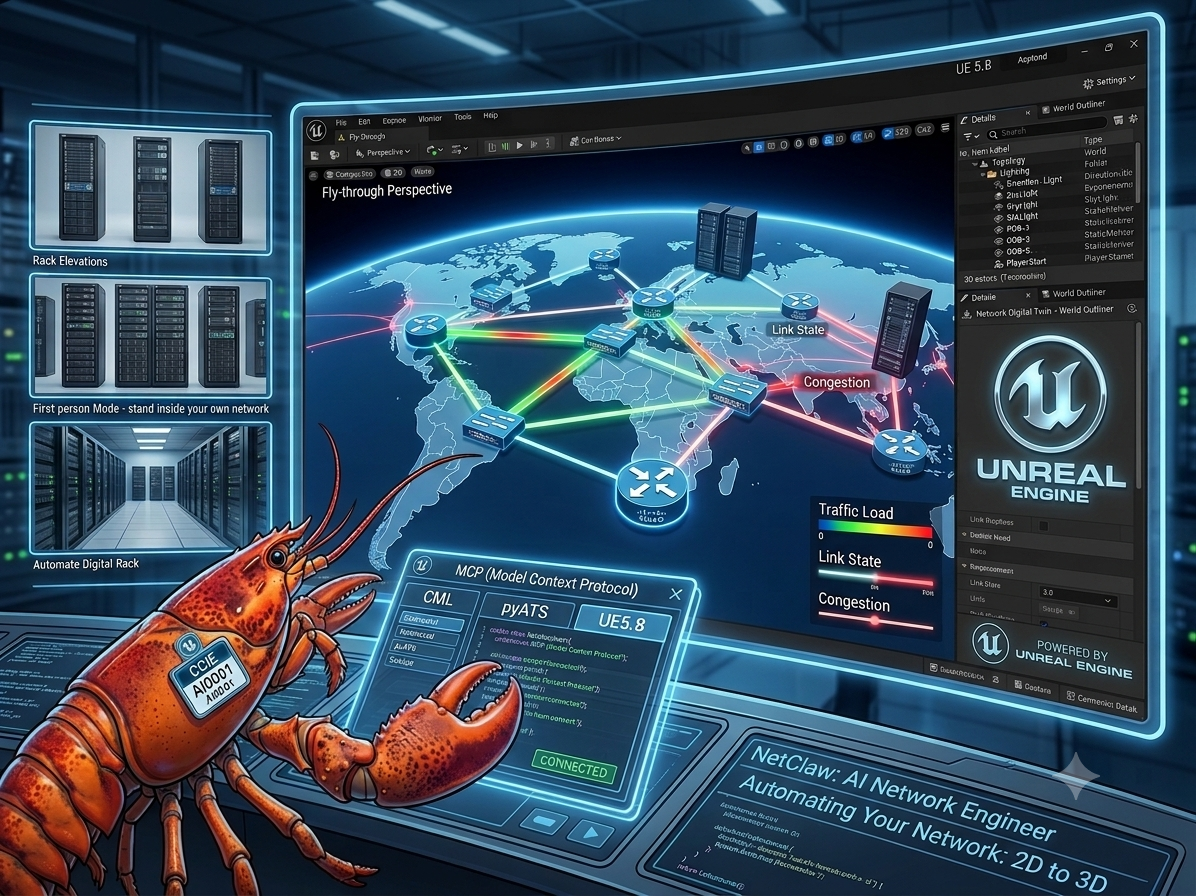
pyATS MCP has been live since April 2025 — one of the first MCP servers to put Cisco pyATS and Genie in front of an AI agent. It worked. It also predates almost everything MCP has shipped since: the SDK was on 1.x, the transport was STDIO only, and the tool surface stopped at show commands, config, and a sandboxed test runner. This is the write-up for bringing it forward — Streamable HTTP, nine new tools, a real CML lab, and two bugs from the original release that had been sitting there, unnoticed, the whole time.
Where this started
The ask was simple on its face: add tools from a companion skills repo, modernize the transport to whatever MCP currently considers “stateless,” and benchmark before against after. Three sentences. What actually happened was closer to a full audit of a fifteen-month-old codebase, conducted against a real, live lab, with the lab occasionally rebooting mid-investigation.
I’ll take the mistakes in the order I made them, because two of them are worth more than the features.
The mistake I made in the first ten minutes
The plan called for mcp>=2.0.0. I ran pip install mcp==2.0.0 to go check its real API before writing anything — and did it in the global environment, not a project venv.
The install succeeded. Pip also printed eight lines of dependency-conflict warnings I almost scrolled past, because that same machine runs several other MCP servers out of the same global site-packages: fastmcp, uml-mcp, servicenow-mcp, and — this is the one that mattered — cml-mcp, the server that talks to the very CML lab I was about to need. All four pin mcp<2.0.0. I'd just broken every one of them to satisfy a version check on a server I hadn't touched yet.
Reverted immediately, back to 1.26.0 globally, then built an isolated .venv for the actual work and never touched the shared environment again. The finding worth keeping isn't "I made a mistake" — it's that the mistake was invisible until I looked at the dependency solver's output on a machine that already had other real tools installed. A throwaway sandbox with nothing else in it would never have caught this.
What "stateless" actually turned out to mean
Streamable HTTP's MCPServer.run() in mcp>=2.0.0 takes a stateless_http flag — True means no server-side session state kept between requests. That's the obvious reading of "stateless," and it's the one I built the first pass of the benchmark plan around.
It's also not the interesting change. SEP-2575, the MCP spec revision dated 2026-07-28, removes the initialize/initialized handshake and the Mcp-Session-Id header from the protocol core entirely — every request instead carries its own _meta block with protocol version, client info, and capabilities. That's a different axis from the transport-level flag, and the SDK does it automatically for any client that negotiates the new protocol version, with zero code required on the server side. I'd conflated "the kwarg named stateless_http" with "the thing SEP-2575 actually changed" until I went and read the SEP text directly.
Both axes turned out to matter for the benchmark, they just answer different questions — which is exactly why the final run measured four conditions, not two.
What my first pass never got to
I wrote a book on pyATS and Genie. The gap between what I've spent years teaching people to do with this framework and what my own MCP server actually exposed was bigger than I'd like to admit. The original five tools were exactly what a CLI-first engineer reaches for on day one — run a show command, push config, learn the running config, learn logging, ping. Real coverage. Also the floor of what pyATS can do, not the ceiling.
The parts I'd wanted in there for years never made the cut the first time, mostly because none of them fit the shape of "wrap a show command":
pcall — pyATS's own parallel-execution primitive, one OS process per target instead of a loop. I reach for this constantly at scale and it had never once been in the MCP server.
Genie's general device.learn(feature) — not "learn config" and "learn logging" as two hardcoded calls, but the actual Ops model library behind them: interface, ospf, bgp, platform, dozens of features, each normalized to a vendor-neutral structure you can diff.
Genie Clean — the staged device reset/reprovisioning framework. Deliberately scoped down to non-destructive stages here, but the hook into the real Kleenex machinery hadn't existed before at all.
Blitz and Robot Framework — the two declarative test-authoring surfaces I point people toward specifically when they don't want to write Python. Neither had ever been reachable from an agent.
The REST connector — pyATS isn't CLI-only; it's had a real REST/RESTCONF/NX-API connection type for years, entirely separate from the SSH path every one of the original five tools used.
None of that is exotic. It's close to the table of contents. It just hadn't made it into the MCP server, because the first version was built to prove the idea worked at all, not to be comprehensive.
Nine new tools, verified against a real lab
The companion skills repo's coverage — pcall, clean, learn, blitz, mock devices — doesn't map onto pyATS's actual Python API as cleanly as the skill names suggest. Two of the five have no supported in-process entry point at all.
Genie device.learn() with named before/after snapshots and genie.utils.diff.Diff
pyats_clean_device
Genie Clean has no supported public API — DeviceClean is an internal class coupled to aetest's global executer state. Shells out to the real pyats clean CLI instead, restricted to non-destructive connect+execute_command stages only, dry_run=True by default
pyats_run_blitz
Same story — Blitz imports the global pyats.easypy.runtime singleton, so it has to run through a real job, not a function call
pyats_run_robot
Robot Framework via the actual installed pyats.robot / genie.libs.robot keyword libraries — there's no pyats robot CLI subcommand in this version, so it runs through the standalone robot CLI
pyats_rest_request
Generic REST/RESTCONF/NX-API via pyATS's own rest.connector — a second, separate connection type from the CLI/SSH one every other tool uses
pyats_xpresso_request
Cisco XPresso's REST API v2, built from the published docs. No live instance to test against — flagged as unverified in the tool's own docstring rather than presented as equal-confidence to everything else
"Mock devices" — the fifth skill — never became a user-facing tool. It became a benchmark fixture instead, once it was clear the actual value was repeatable timing runs, not another tool an agent would call.
Two bugs from April 2025, still there
Every one of the nine tools got a real call against a real CML lab before I called it done — four IOS-XE devices, reachable once I worked out which network they were actually on (more on that below). That process surfaced two defects in code that shipped over a year ago and had presumably been called successfully many times since.
pyats_run_dynamic_test's report was always empty. The original code passed --json-job <path> to pyats run job and read the report back from that path. That flag does not exist in this pyATS version's CLI. Not deprecated — never present in --help at all. The argument parser accepts it silently, produces no report file, and the job still exits 0. The tool never crashed, never logged an error, and its report field was quietly None on every single call since launch. pyATS does archive every run to a real zip under ~/.pyats/archive/ by default, with an actual results.json inside — the fix reads that instead, and now returns a genuine structured report with pass/fail counts.
Blitz jobs failed on any lab with one unreachable device — including devices the job never asked for.pyats run job invokes genie.harness's common_setup, which by default connects to every device in the testbed handed to it, not just the ones a specific trigger targets. Point Blitz at a testbed where three of seven devices aren't up yet, ask it to run one command against a device that is up, and the whole job errors out in setup before it ever reaches your device. The fix generates a testbed scoped to only the devices a given call actually needs.
Same shape both times: a tool that looks like it's working — no exception, no error field, a plausible-looking exit code — while quietly not doing what it claims. Neither would show up in a unit test with a mocked device. Both only showed up because something insisted on hitting real hardware before calling the work finished.
The testbed was pointing at the wrong network
The CML lab's testbed.yaml had four IOS-XE devices at 10.10.20.171–174. None of them were reachable. ip route showed no path to that subnet at all — not a timeout, a routing-table gap.
The lab's own OOB-MGMT network told a different story. One device's running config, pasted mid-investigation, showed an interface configured at 192.168.2.201 — a subnet that was reachable. Rather than guess at the other three, I used the credentials already sitting in ~/.openclaw/.env for the existing cml-mcp server to query the CML controller's own API directly (virl2_client, read-only) and asked it where it thought each device's management interface actually was. It answered with exact IPs, discovered from the lab's own ARP/L3 tables: .201, .202, .211, .212. A short port scan across the neighboring range confirmed all four were real, live, and speaking Cisco's SSH banner before a single credential was tried.
The lesson isn't "the lab was misconfigured." It's that the CML controller already knew the right answer, in a format a script could ask for directly, and guessing at the network from the outside would have taken far longer than just asking the source of truth.
The benchmark, and the answer I didn't expect
Four conditions, against the same four real devices, each running the same scenario set: STDIO on the pre-modernization server (mcp==1.26.0), the modernized server negotiating the new handshake-free protocol, and the modernized server under the old handshake-based protocol with stateless_http toggled both ways.
Condition
Connection setup
STDIO (pre, mcp==1.26.0)
1.074s
Streamable HTTP, modern protocol
0.025s
Streamable HTTP, legacy protocol, stateful
0.023s
Streamable HTTP, legacy protocol, stateless
0.026s
Streamable HTTP sets up a connection roughly 40–50× faster than STDIO — no surprise, since STDIO means forking a fresh Python process and re-importing pyATS and Genie every single time, and HTTP just opens a request against a process that's already running.
Per-call latency for the actual tools, though, was identical across all four conditions — single show command, thread-pool fan-out, pcall fan-out, device health, all within noise of each other, all around 15–18 seconds. Connection caching defaults to off, so every call does a real SSH connect and disconnect to a CSR1kv, and that cost swallows any transport-layer difference completely. The one signal that did survive the noise: pcall's fan-out ran consistently ~150–200ms slower than the thread-pool version, which is exactly the fork overhead its own documentation describes.
I could have reported "Streamable HTTP is faster" and stopped there, and it would have been technically true and substantially misleading. The honest version is narrower: modernizing the transport buys you cheap, frequent connections — which matters if you have many short-lived clients — and buys you almost nothing on a workload that's bottlenecked on SSH negotiation to real gear. Both of those are real findings. Only one of them is the one a changelog would lead with.
Where it stands
26 tools now (the tool table in the README had been silently missing two working tools — pyats_show_running_config and pyats_show_logging — since launch; caught it while cross-checking the table against the actual @mcp.tool() registrations rather than trusting either version of the document). 119 unit tests, up from 85, all mocked, no real devices required to run them. A benchmark/ harness that stays in the repo rather than living only in a chat transcript. And a rewritten README with real, source-verified instructions for wiring the server into Claude Code, VS Code's Copilot Chat, OpenAI's Codex CLI, Claude Desktop, and raw Python — including the one that looks like it should just work and doesn't: Desktop's config file is stdio-only, a url field in it fails silently, and the actual supported path is either a Custom Connector against a public HTTPS endpoint or an mcp-remote stdio bridge for anything running on your own machine.
Merged to main as PR #13. CI is temporarily disabled — out of Actions minutes, not a statement about the pipeline — and the one thing still red when it comes back is a black formatting check that was already failing a month before any of this started.
The uncomfortable part
I wrote a book to teach people how pyATS and Genie actually work — the Ops model, the connection classes, when to reach for Blitz instead of a raw testscript, why pcall exists instead of a loop. That book's entire premise is that understanding the framework is the value. Every tool in this post is an abstraction that lets an agent reach the same capability without a human needing to know any of that. Ask it to snapshot OSPF state, push a change, and diff what moved, and it picks pyats_learn_feature and pyats_diff_learned_snapshots on its own. Nobody has to have read the chapter first.
I don't think that makes the book worthless. I think it means the value moved. Fewer people need to know pyATS's API to get something real done with it, which was arguably the whole point of automation to begin with. It does mean I'm the one shrinking the book's core pitch, one tool at a time. I'm fine with that trade. I'd rather be the one making myself obsolete than watch someone else do it slower.
A working start-to-finish guide. Tested on an M-series MacBook Pro, August 2026.
Read this first: there is one non-obvious step that will waste your afternoon if you miss it — you must convert the weights at BF16, not F16. Details in step 6 and in Troubleshooting. Everything else is routine.
What Antares-1B actually is
An open-weight 1B model from Cisco Foundation AI, built on IBM Granite 4.0 1B, specialized for vulnerability localization. Given a CWE description and a repository, it explores the codebase through a terminal — issuing grep, find, cat — and submits a list of files it believes contain the vulnerability.
Two things to internalize before you start:
It is not a chat assistant. The model card explicitly lists general-purpose chat and instruction following as out-of-scope. Asking it “what are your capabilities” gets you nothing useful even when the setup is perfect.
It is one half of an agent loop. It emits <tool_call> JSON; your harness executes the command and feeds the output back as <tool_response>. It runs up to 15 terminal calls, then terminates via submit_vulnerable_files or submit_no_vulnerability_found.
License is Apache 2.0. The Hugging Face repo is gated behind a contact-info form. Expect ~100 tok/s on Apple silicon. Benchmark is File F1 0.209 on Cisco’s VLoc Bench — useful for triage, not a scanner replacement.
Prerequisites
macOS on Apple Silicon
Homebrew
~15 GB free disk (4 GB weights, 3.7 GB GGUF, plus PyTorch)
requirements.txt already installs huggingface_hub at a compatible version. Do not run pip install -U huggingface_hub — that pulls the 1.x line, which breaks transformers. If you already did:
pip install "huggingface_hub<1.0"
pip check    # should report no broken requirements
This is the step that matters. Granite 4.0 is a hybrid Mamba/attention architecture. The SSM state updates exceed F16’s dynamic range, saturate, and the model collapses into emitting a single repeated token forever. BF16 has the same bit width but far more exponent headroom and survives fine.
Symptom if you get this wrong: the model loads cleanly, reports ~100 tok/s, and prints @@@@@@@@@@@... in response to anything.
This is also why the community mradermacher / mitkox GGUF conversions on the Hub don’t work — they appear to route through an F16 intermediate. Convert it yourself.
7. Verify with llama.cpp before touching Ollama
llama-cli -m ~/models/antares-1b-bf16.gguf --jinja -no-cnv \
  --temp 0.3 --top-p 1.0 \
  -p "Vulnerability to locate: CWE-78 OS Command Injection."
--jinja uses the template embedded in the GGUF, so there is nothing to hand-write and get wrong. This isolates model correctness from Ollama config.
Expected: coherent reasoning prose, then </think>, then a response. The reply starts mid-thought with no opening <think> tag — that is correct. The template pre-fills it.
If you see @@@@, stop here and go to Troubleshooting. Do not proceed.
8. Import into Ollama
Ollama does not pick up the chat template from this GGUF automatically, so supply it explicitly. Without it Ollama sends raw text with no role markers and no stop token, and you get @@@@ again even from a good BF16 file.
cd ~/models
cat > Modelfile <<'EOF'
FROM ./antares-1b-bf16.gguf

TEMPLATE """<|start_of_role|>system<|end_of_role|>{{ if .System }}{{ .System }}{{ else }}You are a helpful assistant. Please ensure responses are professional, accurate, and safe.{{ end }}<|end_of_text|>
{{ range .Messages }}{{ if eq .Role "user" }}<|start_of_role|>user<|end_of_role|>{{ .Content }}<|end_of_text|>
{{ else if eq .Role "assistant" }}<|start_of_role|>assistant<|end_of_role|>{{ .Content }}<|end_of_text|>
{{ end }}{{ end }}<|start_of_role|>assistant<|end_of_role|><think>
"""

PARAMETER stop "<|end_of_text|>"
PARAMETER stop "<|start_of_role|>"
PARAMETER temperature 0.3
PARAMETER top_p 1.0
PARAMETER num_ctx 32768
EOF

ollama create antares-1b -f Modelfile
Note there is no --quantize flag on the first build. Get it working unquantized, then shrink.
Three details in that template, all derived from the model’s real chat_template.jinja:
A system block is always emitted — the Jinja has no “if system” branch, it injects a default. Making it conditional produces a prompt shape the model never saw in training.
The generation prompt pre-fills<think>\n. The model starts already inside a reasoning block.
Temperature 0.3 / top-p 1.0 are the settings Cisco used for every published evaluation. Ollama’s defaults (0.8 / top-k 40 / repeat-penalty 1.1) are far too loose for an agentic model.
Verify:
ollama show --modelfile antares-1b | head -30
If TEMPLATE shows {{ .Prompt }}, the template didn’t take — rebuild.
ollama run antares-1b "Vulnerability to locate: CWE-78 OS Command Injection."
9. Shrink it (optional)
3.7 GB is large for a 2B model. Step down one level at a time and test each:
ollama create antares-1b:q8 --quantize q8_0 -f Modelfile
ollama run antares-1b:q8 "Vulnerability to locate: CWE-78 OS Command Injection."

ollama create antares-1b:q4 --quantize q4_K_M -f Modelfile
ollama run antares-1b:q4 "Vulnerability to locate: CWE-78 OS Command Injection."
If a level produces @@@@ or degraded reasoning, you’ve found the floor for this architecture — stay one level up. Hybrid SSM models are more quantization-sensitive than plain transformers.
10. Run it as an agent
The REPL is a diagnostic, not a workflow. To see real tool calls, give it the system prompt it was trained against:
ollama run antares-1b

>>> /set system You are a security vulnerability localization agent. You have access to a terminal with the repository mounted at /workspace/repo/. Use shell commands (grep, find, cat, etc.) to explore the codebase and identify files that contain the reported vulnerability. When confident, submit your findings.
>>> Vulnerability to locate: CWE-78: Improper Neutralization of Special Elements used in an OS Command ('OS Command Injection').
Success looks like a <tool_call> block containing a shell command. The model is asking you to run it and return the output.
For the real loop, Cisco ships the Antares CLI as a ZIP in the Files tab of the model repo. It implements the full agent loop against any OpenAI-compatible endpoint:
ollama serve # exposes http://localhost:11434/v1
Configure the CLI with base URL http://localhost:11434/v1, model antares-1b, and any dummy API key. It supports targeted CWE analyses and repo-wide sweeps, with output in human-readable, JSON, or SARIF.
Alternative: skip Ollama entirely and use llama-server, which gives you the same OpenAI-compatible endpoint and tends to get Granite hybrid fixes first:
You are executing shell commands the model invents. Per Cisco’s recommendations:
Run the target repo snapshot in a container with --network=none
10 second command timeout
2 CPU cores, 4 GB RAM limit
Destroy the container after each run
Human review before any remediation action
Troubleshooting
@@@@@@@@@ output
Ranked by likelihood:
GGUF converted at F16 instead of BF16 → reconvert (step 6)
Ollama Modelfile missing TEMPLATE → check ollama show --modelfile
Quantized too aggressively → rebuild unquantized and re-test
Using a community GGUF from the Hub → convert it yourself
401: Invalid username or password from ollama pull
Not an auth problem. Hugging Face returns 401 rather than 404 for repos it can’t show you, to avoid leaking whether private repos exist. You almost certainly have the repo name wrong. (mradermacher/Antares-11b-v2-GGUF is a different, unrelated model — an old 11B SOLAR finetune. Nothing to do with Cisco Antares.)
Ollama and gated/private repos
Ollama’s HF integration doesn’t use tokens at all. It authenticates with the SSH key at ~/.ollama/id_ed25519.pub — add that to https://huggingface.co/settings/keys.
pyenv: python: command not found
No pyenv version is active:
pyenv global 3.10.14 && pyenv rehash
If it still fails, your ~/.zshrc is missing eval "$(pyenv init -)".
zsh: bad pattern: ^[[200~
Bracketed-paste escape leaking into zsh. Run exec zsh, or paste one line at a time.
cmake: command not found
You don’t need it — brew install llama.cpp gives prebuilt binaries. Only brew install cmake if you specifically need to build from source (e.g. to pick up a fix newer than the brew formula).
transformers … requires huggingface-hub<1.0
See step 4.
Cross-checking against reference weights
If GGUF misbehaves and you want to know whether the weights themselves are fine:
cd ~/llama.cpp && source .venv/bin/activate && pip install accelerate
python - <<'EOF'
from transformers import AutoTokenizer, AutoModelForCausalLM
import os
p = os.path.expanduser("~/models/antares-1b")
tok = AutoTokenizer.from_pretrained(p)
m = AutoModelForCausalLM.from_pretrained(p, device_map="cpu")
msgs = [{"role":"user","content":"Vulnerability to locate: CWE-78 OS Command Injection."}]
i = tok.apply_chat_template(msgs, add_generation_prompt=True, return_tensors="pt", return_dict=True)
o = m.generate(**i, max_new_tokens=80, do_sample=True, temperature=0.3, top_p=1.0)
print(tok.decode(o[0][i["input_ids"].shape[-1]:], skip_special_tokens=False))
EOF
Coherent here but garbage from every GGUF = a llama.cpp conversion/runtime gap. Check the llama.cpp issue tracker, or serve with vLLM, which the model card documents as supported.
On July 30th I sat down and wrote a roadmap: twenty-five identified gaps in what NetClaw could actually reach, ordered by dependency, with one rule at the top — one item, one spec, one branch, no batching. Six days later, twenty-three specs had merged. Twelve new MCP servers. Twenty-three new skills. And a running argument with reality that corrected the roadmap four separate times.
This is the write-up for specs 076 through 098. It is long, because a lot shipped. If you only read one section, make it the last one — the through-lines are more useful than any individual integration.
The setup: a roadmap, and one rule
NetClaw has a lot of reach. It talks to Cisco through pyATS and RADKit, to Juniper through JunOS, to Arista through CloudVision, to NetBox and Nautobot and Infrahub for source of truth, to Grafana and Prometheus and Splunk and Datadog for observability, to CML and ContainerLab and GNS3 and EVE-NG for labs. Before this run: 199 skills, 149 MCP integrations.
But “a lot of reach” is not the same as “no holes,” and I’d never actually sat down and enumerated the holes. So I did a landscape scan — vendor and community MCP registries, awesome-mcp-servers, Itential’s 56-server network automation guide, Cisco and Juniper and HPE official releases, anthropics/skills, and the IETF datatracker — and turned it into docs/COVERAGE-ROADMAP.md: twenty-five items, R0 through R24, ordered by dependency and then by value-per-effort.
The rule at the top of that document is the whole methodology:
Work top to bottom. One roadmap item = one spec = one branch. Do not batch.
Every item goes through the full spec-driven cycle: specify, clarify, plan, task, implement, verify. Every item ends with a merged branch and a reconciliation gate that exits zero. And crucially — every item is treated as a hypothesis, not an instruction.
That last part turned out to matter enormously.
What landed
Item
Spec
What shipped
R0a
077
Dependency-pin hazards fixed and gated
R0b
090
Dead registered servers fixed; startup becomes a hard gate
R1
076
multivendor-cli-mcp — SSH/NAPALM to ~175 platform families
R2
078
cisco-psirt-mcp — live version to published advisory
Globalping — the first vantage point outside my own domain
R9
081
bgp-intel-mcp — RPKI, RDAP, PeeringDB, RIPEstat
R11
083
zabbix-mcp — NetClaw’s first polled history
R12
096
Elasticsearch log search
R13
091
nsm-mcp — Zeek and Suricata offline PCAP analysis
R14
084
k8s-mcp — read-only Kubernetes
R15
094
redfish-mcp — out-of-band hardware, “is the box dead or is it the network”
R17
092
analysis-mcp — DuckDB over exported network data
R18
082
document-mcp — docx, xlsx, pptx, pdf
R22
093
Closed as already satisfied — and found a real defect doing it
R23
085
IETF MCP landscape survey feeding NCFED -01
R24
097
All 22 open-territory candidates dispositioned
R25
098
anta-mcp — the assertion layer
—
087
Cisco Catalyst Center, read-only
—
088
Startup check — the fifth reconciliation surface
—
089
Cisco Meraki official, adopted, zero code
—
095
Juniper Mist measured against the token ceiling
—
086
ntopng deferral, recorded with evidence
Ninety-three commits. 401 files. +62,926 / −1,379. 199 skills to 221; 149 MCP integrations to 163.
First, the boring specs that turned out to be the important ones
Two of the three foundation items weren’t in the original roadmap at all. They got inserted because the foundation turned out to be less solid than I’d established.
The bug that only breaks people who aren’t you
While implementing R1, I found that mcp 2.0.0 had removed mcp.server.fastmcp entirely. Not moved. Not deprecated with a shim. The 2.0.0 wheel contains zeromcp/server/fastmcp/ files and doesn’t declare fastmcp as a dependency, so there is no re-export to fall back on.
Any server with an unbounded mcp>=1.0.0 pin that imports that module resolves a breaking major on a fresh install. My install was fine — my versions were already resolved months ago. Only new installs broke, which is exactly why nobody had noticed.
Spec 077 fixed it, and then fixed the class rather than the instance:
Repair
Scale
Unbounded pins on packages whose submodules are imported
25 failures across 20 servers
Bare pip calls routed through one helper
130
GAIT’s unbounded install (the audit trail itself)
bounded
New CI gate surface
dependencies
Contract tests, including false-positive guards
23/23
The finding worth keeping: my hand audit found 7 exposed servers. The static scan found 25 across 20. The audit looked for the pattern I already knew — unbounded mcp>= plus that one import. The scan looked for the class: any unbounded pin on any package whose submodule is imported anywhere.
A human audit finds what it expects. A static scan finds what is there.
Seven registered servers that could not start
Here’s the one that stung.
NetClaw’s reconciliation gate had four surfaces: installer coverage, documented counts, registration portability, dependency pins. All four validate that things are declared consistently. Spec 088 asked a question none of them asked: can a registered server actually start?
It launches all 98 registered stdio servers and watches what happens. Result: seven could not start at all, and 22 skills routed to them — while reconcile-mcp.py exited 0 and CI passed green.
A first pass at this by static import analysis reported 11 findings, 5 of them false, because sys.path resolution is a runtime fact and reading source cannot tell you whether an import will succeed. Only launching the process gives the truth. That’s written into the script’s own docstring so nobody repeats the shortcut.
Spec 090 then fixed six of the seven, and the root cause was a single function. netclaw_pip_install had no handling for PEP 668 (the “externally managed environment” error) — while 56 call sites hid the resulting failure behind --break-system-packages 2>/dev/null || log_warn. Every one of those installs could fail silently and the installer would carry on cheerfully.
The seventh is an enumerated exception with a written reason: RADKit ships code-signed wheels outside PyPI. startup is now a hard gate.
It also corrected spec 088’s own claim that prisma_sase was unavailable. It wasn’t. That was a PEP 668 error being read as an availability error.
The gate now runs seven surfaces: catalog, docs, portability, dependencies, startup, meraki-ids, and packages. Plus a separate one added during 096, after an audit found ten consecutive specs shipping with spec.md alone against 72 of 86 carrying the full artifact set. That drift was self-reinforcing in a way I find genuinely interesting: an author checking the three most recent specs for the convention saw the drift, and read it as the convention.
The biggest single item: SSH to anything
Before spec 076, NetClaw’s device reach was pyATS, JunOS, gNMI and RADKit. Excellent coverage of Cisco and Juniper. No way to SSH to anything else.
multivendor-cli-mcp is 10 tools over Nornir, Netmiko and NAPALM, and it is read-only by default with a server-side command filter — not a prompt instruction, not a skill convention, an actual filter in the request path that the model cannot talk its way around. Inventory comes from NetBox, Nautobot or Infrahub as source of truth, never a credentials YAML. Writes need two distinct gates: human approval and an approved ServiceNow change record, with separate refusal outcomes so they can never be conflated.
94/94 tasks, 31/31 live integration checks, 175 driver-documented platform families:
Verified live
Evidence
Nokia SR Linux, native NOS CLI
real show version, show interface brief
FRR via vtysh, shell-hosted
real routing table through the linux driver
IOS-XE normalized read
NAPALM ios, real hostname and interfaces
SR Linux normalization gap
reported as a row with a reason, never silently omitted
live instance: production + approval but no CR → blocked
Both candidate community servers were rejected. One is archived, has two stars, and reloads config.yaml from the current working directory on every single call — threading its inventory assumption straight through the request path. The other has no command filtering at all. Both store credentials in YAML.
But I deliberately ported the archived one’s safety design — prefix allowlist, destructive-token denylist, chaining prevention, path sandboxing. That’s the part most easily got wrong, and somebody had already thought it through carefully. Rejecting a project is not the same as rejecting its ideas.
Three bugs only real devices found, and one of them is a nice trap:
The command filter blocked FRR’s only read path.vtysh -c "show ip route" starts with vtysh, not show. The tempting fix — allowlist vtysh — would also have permitted vtysh -c "configure terminal", which is a config escape wearing a read command’s clothes. Fixed by unwrapping the wrapper and judging the inner command.
SR Linux was under-protected because nokia_srl (the driver and inventory name) is not nokia_srlinux (the denylist table key), so the denylist quietly didn’t apply. Alias normalisation now runs first.
The ITSM gating had zero test coverage, and the plan had claimed it was “inherited from the existing approval path.” That was an assertion, not a fact. Human approval and a change record are distinct gates and now have distinct tests.
Asking Cisco whether the box you’re looking at is vulnerable
Spec 078 closes a top-five real-world netops question: is this build affected by a published advisory?
R2 was planned as “Cisco Support APIs — PSIRT, EoX, Bug Search, Case.” Measuring the APIs before writing the spec cut it from eight families to one:
Family
Result
PSIRT openVuln
200 — this is the feature
Bug Search
403
EoX
403
Case
403
Serial → Info
403
CX Cloud, 7 paths
504
The API Console grant covers PSIRT and nothing else. Which is exactly why the obvious community candidate — 46 tools across all 8 families — was not adopted: seven-eighths of that tool manifest would have been dead surface, spending tokens on every single turn to advertise capabilities that return 403.
I’ll say the uncomfortable part plainly: EoL/EoS lookup was half of R2’s original value and it is not delivered. Not descoped for convenience — unreachable with the entitlement available.
Verifying all seven PSIRT OS types then produced my favourite finding of the run. Cisco’s version formats contradict each other across families:
OSType
Accepted
Rejected
iosxe
17.3.1, 17.03.01, 17.3.1a
17.3(1)
ios
15.2(4)E, 15.2(4)E10
15.2.4E
nxos
9.3(5)
9.3.5
asa
9.16.1
9.16(1)
aci
15.2(3e)
5.2(3e), 5.2.3
ios and nxos require exactly the formiosxe rejects. aci wants the letter suffix inside the parentheses where ios wants it outside — and it wants the switch image version, not the APIC version, so an operator reading the number off their APIC hands over something the API refuses. The single global normalisation rule my spec had drafted would have broken ios and nxos on every call.
Then the whole chain on a live CML router: pyATS read IOS-XE 17.16.1a off the device, PSIRT returned 26 advisories — 14 High, 11 Medium, 1 Critical (CVE-2025-20363, CVSS 9.0). No human typed a version anywhere in that path.
Rate discipline is contractual and ordered: de-duplicate, then cache, then pace, then back off. Measured — 60 devices running 12 distinct versions costs 12 API calls, not 60. De-duplication is first because it’s the largest win; pacing an un-de-duplicated sweep just spreads the same excess over more minutes.
Fortinet, and a skill that was lying
R3’s premise turned out to be worse than “there’s no server.” The fortimanager-ops skill shipped with user-invocable: true, declaring environment variables and naming a specific community server — that was never vendored, never registered, and not installable. The installer even cloned the repo. A federation member was configured to run against the phantom command.
That’s not a gap. A gap is honest. That’s a claim — and an agent routing a firewall question to it finds out mid-investigation.
Spec 080 shipped 21 tools across three planes for a 2,486 of 5,000 token manifest, built rather than adopted on four independent disqualifications: no candidate emits a plane field, the manifests run 69–204 tools each, only one enforces read-only (another exposes package install ungated), and none has any concept of a change record.
The three planes are not substitutes for each other, and that’s the design:
Manager = intent. What the policy says it should be.
Device = observed state. What the box is actually running.
Analyzer = observed traffic. What actually hit the rule.
fgt_compare_with_manager reports only_in_device rules as candidate out-of-band changes — something that is invisible from either plane alone. Device plane verified live from Slack against FortiOS 7.6.7.
The follow-up spec is worth a paragraph on its own, because NetClaw reported the defect on itself, unprompted, during live testing.fgt_list_interfaces was reading only the monitor endpoint, which carries operational reality — link state, speed, counters. Administrative intent lives in cmdb: status, role, allowed access. An interface that is administratively DOWN with a live carrier reports link: true and looks perfectly healthy if you only read one of them. It now merges both, reports admin_status and link separately, flags the admin_up_link_down combination, and reports admin status as UNKNOWN if the config read fails — rather than assuming “enabled” and silently recreating the exact conflation it was written to fix.
Two Cisco cloud platforms, two opposite answers
Catalyst Center and Meraki landed the same week and demonstrate the single design constraint that decided more of this run than any architectural preference: the 5,000-token tool manifest ceiling.
Cisco’s official Catalyst Center MCP server exposes 515 tools ≈ 64,420 tokens. Thirteen times the ceiling. So spec 087 built a thin client over Cisco’s own published catalogue instead: 514 read operations reachable through 8 dispatchers plus find/describe, for 1,821 tokens. All the coverage, none of the manifest.
Meraki went the opposite way — adopted with zero lines of code. Cisco’s remote MCP is 2 tools exposing 494 read-only capabilities for 1,561 tokens, and the read-only property is structural rather than promised: 431 mutating operations are simply absent from the catalogue. I verified 10 of 10.
Adopting it retired the dead community Meraki server, which took spec 088’s dead-server count from 7 to 6. And it surfaced something I did not expect: 54 of the 80 method names the five Meraki skills documented did not exist in the Meraki API. Same defect class as the phantom FortiManager server — documentation that reads as capability. There is now a dedicated gate surface that validates skill text against Cisco’s own OpenAPI spec, vendored offline.
Looking at the internet from the outside
NetClaw had zero external-vantage capability. No ASN lookup, no route-origin validation, no peering data, no third-party reachability. Not a missing tool — a missing domain.
Spec 079 (Globalping) was rated the highest value-per-effort item in the entire scan, and it held: no server was written. One remote registration, one skill. ~4,800 probes across ~1,390 autonomous systems, measuring toward a public target. It answers “the router is fine, so why can’t anyone reach us?” — which NetClaw previously could not address at all.
The whole feature is a registration plus prose, which is precisely why the prose had to be right:
Response
What it means
no_probes_found (422)
The measurement never ran. Says nothing whatsoever about the target
finished, 0 of N successful
The target did not answer. A real finding
Private or internal target
Refused locally, before calling out
The first one is the trap. It arrives failure-shaped, and an agent reading it carelessly escalates a total outage that does not exist.
That third row is a disclosure control, not a correctness one. Globalping rejects RFC1918 itself, with good error text — but by the time it does, an internal hostname has already been transmitted to a third party. So NetClaw refuses first.
Two more things worth knowing if you use this API: the budget is charged per probe, not per call (limit: 20 costs 20), and AS13335 appears as a location example in Globalping’s own tool schema while hosting no probes at all. Anyone learning the syntax from the vendor’s own example tries it first, gets no_probes_found, and concludes ASN filtering is broken. The skill names this explicitly so the wrong lesson doesn’t get learned.
Spec 081 is the other half. Globalping measures toward a target; BGP intelligence looks up who owns a resource and whether an announcement is authorised. Ten tools, all ten live-verified, 1,376 tokens — and the first NetClaw integration with no secret to leak, because every source is a public unauthenticated API.
The distinction is the entire feature: RPKI not-found is not invalid. Most of the internet has no ROA. Reporting unsigned address space as a finding would manufacture false incidents at scale.
Query
State
Reason
Finding?
AS13335 + 1.1.1.0/24
valid
—
no
AS13335 + 8.8.8.0/24
invalid
as
yes
AS15169 + 8.8.8.128/25
invalid
length
yes
AS3356 + 4.0.0.0/9
not_found
—
no
There’s a fifth outcome, validation_unavailable: an unreachable validator is not unsigned space. Same distinction, one level down.
Every result names its registry or its collector. PeeringDB results carry a self-reported caveat, because PeeringDB is self-reported. And the rate limiter is a true sliding window — the first implementation used a minimum 250 ms gap and measured 4.53 requests per second against a 4/s target, because N requests spaced 250 ms apart put five of them inside one second.
Monitoring, traffic, and the layer beneath the network
Zabbix (083) was the first adopt, not build on the roadmap. NetClaw had Prometheus, Grafana, Datadog, Splunk, Auvik and ThousandEyes — and no SNMP-poller NMS at all, and therefore no polled history anywhere. The adopted server is 3 tools and 589 tokens; it is essentially the design I would have produced. The alternatives, measured by cloning and scanning rather than reading READMEs, run 53, 111 and 237 tools. It runs in a dedicated virtualenv because it needs fastmcp 3.x while five other NetClaw servers pin <3, and it’s strictly read-only: adopting as-is leaves nowhere to insert NetClaw’s two write gates, so writes were deferred rather than shipped ungated.
Zeek and Suricata (091) added the network-security-monitoring layer that was entirely absent: read-only offline PCAP analysis from digest-pinned containers, 6 tools / 934 tokens, 19 assertions. Arkime was rejected — mandatory OpenSearch plus 12–16 GB is a platform, not a tool. Two silent wrong answers were reproduced live and structurally blocked:
Stock Suricata loads zero signatures and cheerfully reports 0 alerts, behind two non-fatal warnings. After a rules update: 52,205 signatures. “No alerts” and “no ruleset” look identical in the output.
Zeek discards invalid-checksum packets by default, which loses http.log entirely and miscounts conn.log. This one matters beyond the new server — it affects the output of NetClaw’s own existing capture skills.
DuckDB (092) arrived after its data, exactly as the roadmap predicted it should. When R17 was first surveyed there were zero parquet files anywhere on the host, DuckDB wasn’t installed, and half the rationale had died with the ntopng deferral. The roadmap’s own conclusion was “R17 should follow whichever item first produces bulk exports” — and 091’s Zeek TSV and Suricata eve.json output is exactly that.
The interesting part is containment. A general SQL engine is a filesystem client: read_csv('/etc/passwd'), ATTACH some other database, COPY … TO, INSTALL httpfs and read over HTTP. Blocking that by inspecting query strings is a losing game — SQL has too many spellings and the one you miss is the one that matters. So enforcement is DuckDB’s own:
1. materialise each allowlisted dataset as a TABLE
2. SET enable_external_access = false   -- filesystem and network close
3. SET lock_configuration = true        -- and cannot be reopened
Eight escape attempts verified to raise. Memory, RAG, federation and GAIT are unreachable by construction, not by my regex.
Kubernetes (084) adopted Red Hat’s Apache-2.0 Go binary, pinned and checksummed. Read-only turned out to be what makes adoption possible: the upstream default is 21 tools / 5,716 tokens and busts the ceiling; trimmed it’s 7 tools / 1,643. It uses an explicit token-only kubeconfig for a dedicated cluster-wide-read ServiceAccount — never the ambient current-context, which might be production.
And it carries the sharpest finding of the whole run. The Kubernetes API is honest — it returns a correct 403 when you list cluster-wide without permission. The adopted server catches that permission error, discards it, and returns a perfectly plausible one-namespace answer with no error at all. Reproduced live in NetClaw’s own test suite, mitigated with a mandated ServiceAccount and a skill preflight.
Redfish (094) answers “is the box dead or is it the network.” Both candidate servers were unvendorable — one has no licence file at all, the other NOASSERTION — so it was built: 6 tools / 728 tokens, 15 assertions, verified against the DMTF Redfish mockup so no hardware was required. The core discipline is that the box-versus-network distinction is symmetric: a BMC timeout establishes nothing about the host and can never be emitted as a downed host, while PowerState: Off genuinely is a fact. Power control is deliberately unimplemented — the client issues no HTTP verb but GET.
Elasticsearch (096) adopted a 5-tool, 1,094-token server, verified against a live Elasticsearch 9.2.0 on a free basic licence with 25,000 indexed documents. It deliberately adopts a deprecated upstream, pinned by digest: the successor is Enterprise-tier on self-managed, so the supported path is paywalled while this one is Apache-2.0 and published.
Its silent wrong answer is a beauty. Elasticsearch caps hits.total at 10,000 and marks it relation: "gte" — and the server discards the qualifier. So 10,075 real documents get reported as “Total results: 10000,” and the error is unbounded: a million-document index also says 10,000. Mitigations verified and written into the skill: use esql, or pass track_total_hits: true.
That spec also corrected a claim I’d made in my own roadmap. I’d written that NetClaw had “no log search at all.” Wrong — Splunk, Datadog logs, GCP Logging and Grafana were all already registered. What was missing was an Elasticsearch backend. Selection between them is now by where the data lives, never by the shape of the question, and if that’s unknown the agent asks.
Documents, because the output lands in front of humans
NetClaw can render Three.js topologies, drawio, markmap, UML, Blender scenes and Unreal Engine worlds — and could not produce a change-record .docx, an exec .pptx, an interface-audit .xlsx, or fill a PDF form. Its output lands in front of enterprise humans who want documents.
The roadmap called this a “vendor the four official skills” item. That was wrong, and finding out why is useful: the four anthropics/skills document skills are source-available “for demonstration and educational purposes only” — not Apache-2.0. (The repo’s example skills are; the document skills specifically are not.) NetClaw ships Apache-2.0, so vendoring them isn’t licence-compatible. R18 became build-rather-than-adopt for a licensing reason, which is a different situation from R1, R3 and R9 where the community options were technically inadequate. Upstream stayed extremely useful for deciding which capabilities matter.
document-mcp: 6 tools, 2 skills, 1,232 tokens, 240 assertions, all four formats live-verified from a real FortiGate and opened in real applications. One server owns all document writing, so generation time, attribution and per-element provenance get stamped at a single chokepoint; skills own the compositions and contain no writing logic at all.
Provenance has to be visible — a source column on every spreadsheet row, a per-figure source in documents and decks, a sources section in every file. Cell comments and document metadata do not satisfy it; nobody reads those.
And the rule the whole server exists to enforce: a document must never fabricate to fill a blank. An empty cell in a generated audit is the correct output when there is no data. A plausible number is a catastrophe wearing a suit.
The assertion layer
The last item of the run, spec 098, is the one I’d been circling without realising it.
NetClaw can read state (pyATS, the new CLI driver, gNMI). It can read what the manager says (CloudVision, FortiManager, Catalyst Center). It can read state over time (SuzieQ, Zabbix). It had no assertion layer — nothing that takes a declarative expectation and returns a structured pass/fail verdict.
Arista’s ANTA is exactly that, and the triage in spec 097 picked it for one reason above all others: it was the only candidate whose verification path needed nothing obtained. A vEOS image was already on disk, containerlab was already installed, ANTA is pip-installable, no vendor account required.
anta-mcp: 4 tools reaching a 208-test catalogue for 1,272 tokens. One tool per test would have been roughly 58,000 — 11.6× over the ceiling — so it uses the dispatcher-plus-discovery shape that Catalyst Center established, and the manifest was counted, not estimated. Verified live against vEOS-lab 4.36.1F over eAPI.
It runs in its own virtualenv, and not by preference: ANTA moves cryptography from 46.0.5 to 50.0.0, and four installed distributions depend on it unbounded — including the federation TLS stack. Caught by a dry run before installing anything, which is a habit spec 076 forced into the process.
Its silent wrong answer is the sharpest of the whole run: ANTA reports a test for an unconfigured feature as a failure.VerifyBGPPeerCount returns “BGP inactive” as a failure on a switch that simply has no BGP configured. A fleet report built on that reads like a disaster and describes a healthy network. The server reclassifies to not_applicable with a deliberately narrow rule that can never hide a real failure — and then emits no health percentage at all, because passed / total is meaningless the moment not_applicable is in the denominator.
Two specs that shipped a decision instead of a server
These are the ones I’m proudest of, which probably says something.
Spec 093 started life as “add Excalidraw and draw.io MCPs.” I mentioned it, and the response was essentially hang on, doesn’t NetClaw already have a pile of diagramming? It did. Measured: the drawio-diagram skill already ships native .drawio files with CLI export to PNG, SVG and PDF; uml-diagram covers 27+ types via Kroki — Mermaid, D2, Graphviz, C4, BPMN, ER, sequence, state — plus markmap, AWS architecture, Visio, canvas, Three.js, Unreal and Blender. Excalidraw adds a hand-drawn aesthetic, not a capability. R22 closed as already satisfied.
The audit that closed it found something real, though. Three Microsoft Graph skills all invoke npx -y @anthropic-ai/microsoft-graph-mcp — and that package 404s on npm. Between them they documented 17 invocations across 14 distinct tool names, none of which could ever run. Same defect class as the phantom FortiManager server and the 54 imaginary Meraki methods: documentation that reads as capability. Every other package a skill invokes was checked — 17 distinct npx/uvx references, and this was the only missing one, so the problem is narrow rather than systemic.
The genuine replacement measures 188 tools ≈ 225,355 tokens — 45× the ceiling, by far the worst measured to date. It supports filtering, so it was adopted as a 12-tool subset. And there’s now a gate surface that verifies every package a skill invokes actually exists.
Spec 095 measured Juniper’s official Mist MCP against the live endpoint using my own org: 7 tools, 11,783 tokens, 2.36× over the ceiling — counted with a real tokenizer, not estimated — and there’s no tool-filtering key in the config across 101 registered servers, so a cheaper subset can’t be loaded. That’s the opposite failure mode from every prior rejection: not too many tools, but ~1,678 tokens per tool.
Three findings shipped with the rejection, and they’re all reusable:
The chars÷4 estimate under-reports by 17% near the ceiling — 10,052 estimated versus 11,783 measured. Enough to turn a “fits” into a breach. Count, don’t estimate.
get_mist_insights requires a query_type parameter its own schema never declares.
sites_sle on an empty org returns count: 1 with no metrics — so a site with no telemetry and a site with no problems are the same shape.
That last one is why the build is blocked rather than merely unstarted: my verification org has one site and zero devices, so the exact failure mode a wireless assurance skill exists to prevent cannot be exercised. Assurance skills whose central failure mode can’t be reproduced don’t get built. The spec, the exit conditions and a re-measurement script all shipped so it can be picked up the day a populated org exists.
The through-lines
Individual integrations are replaceable. These four patterns are what I’d actually carry to the next project.
1. The token ceiling decided more designs than any architectural preference
Every tool a server advertises costs tokens on every single turn, forever, whether or not it’s called. NetClaw budgets 5,000 tokens per server manifest. Look what that one number decided:
Integration
Tools
Manifest
Outcome
Elasticsearch
5
1,094
adopt as-is
Meraki
2
1,561
adopt as-is
Kubernetes
21 → 7
5,716 → 1,643
adopt, trimmed
Catalyst Center
515 → 10
64,420 → 1,821
build a dispatcher over the catalogue
Arista ANTA
208 tests → 4
~58,000 → 1,272
build a dispatcher
Juniper Mist
7
11,783
reject — no filtering mechanism exists
Microsoft 365
188
225,355
adopt a filtered 12-tool subset
Also worth noting: a tool count is not a capability count. Globalping advertises 12 tools, but 6 of them take only a context argument. The real capability is 5 measurement tools.
2. “Nothing came back” is not “nothing is wrong”
This is the one I’d tattoo on an agent if I could. Ten specs in a row shipped a named refusal state rather than an empty success, because an empty result and a failed question look identical in the data and only one of them means the network is fine.
Spec
The confusion that is now structurally blocked
078
No advisories ≠ not vulnerable. A normalisation failure ≠ a clean bill of health
079
no_probes_found ≠ an outage
080
No logs ≠ the rule is unused
081
RPKI not-found ≠ invalid. An unreachable validator ≠ unsigned space
084
A discarded 403 ≠ a one-namespace cluster
091
Zero loaded signatures ≠ zero alerts
094
A BMC timeout ≠ a downed host
095
An empty org ≠ a healthy org
096
hits.total: 10000, gte ≠ 10,000 documents
098
An unconfigured feature ≠ a failed test
A confidently wrong answer is far worse than a refusal. Every one of those rows is a case where the tool would have answered smoothly and the answer would have been false.
3. Sequence by verifiability, not by value
Three items stalled on the same question in a single week: can this be verified today, with the access I actually have?
ntopng’s free edition can’t do the job — flow history to ClickHouse is hard-gated to Enterprise M+, verified in ntop’s own source, and it fails open: with the licence missing it logs a warning, silently disables storage, and starts healthy. Dynatrace and New Relic are SaaS-only with no self-hostable path. Mist’s org is empty.
Each of those was worth building and could not be proven. An item that ships unverified isn’t a closed item; it’s a claim. Confirming access costs minutes before the spec is written and costs a day after.
4. A roadmap item is a hypothesis, not an instruction
Four premises in my own roadmap did not survive first contact:
Item
The premise
What measurement found
R2
Four Cisco API families
Three return 403 — rescoped to PSIRT alone
R10
ntopng gives flow history
Enterprise M+ only, verified in ntop’s own source
R17
A query layer is needed now
Nothing to query until 091 produced exports — resequenced
R22
Diagram coverage is missing
Already satisfied; Excalidraw is an aesthetic, not a capability
And twice, the premise was questioned by a human and the human was right. The measurement is the first deliverable of every item, not the paperwork you do afterward.
Where it stands
Of twenty-five roadmap items, seventeen are closed: sixteen done, one done-and-narrowed, one closed as already satisfied. One is deferred with evidence. One is blocked on a populated vendor org, with the build fully specified and a re-measurement script shipped. Seven remain unstarted, and they’re honestly triaged into “buildable and verifiable today” versus “blocked on access, not on effort” — Palo Alto needs an image, vSphere needs a vCenter, Aruba Central needs a tenant with devices.
Everything above is merged to main. The reconciliation gate exits zero across all seven surfaces, and CI fails the merge if it doesn’t.
221 skills. 163 MCP integrations. Six days.
The roadmap lives at docs/COVERAGE-ROADMAP.md in the repo, with every disposition, every measurement, and every corrected premise recorded in place rather than quietly patched. If you want to know why something wasn’t built, the reason is written down — which, for my money, is the part that makes a roadmap worth keeping.
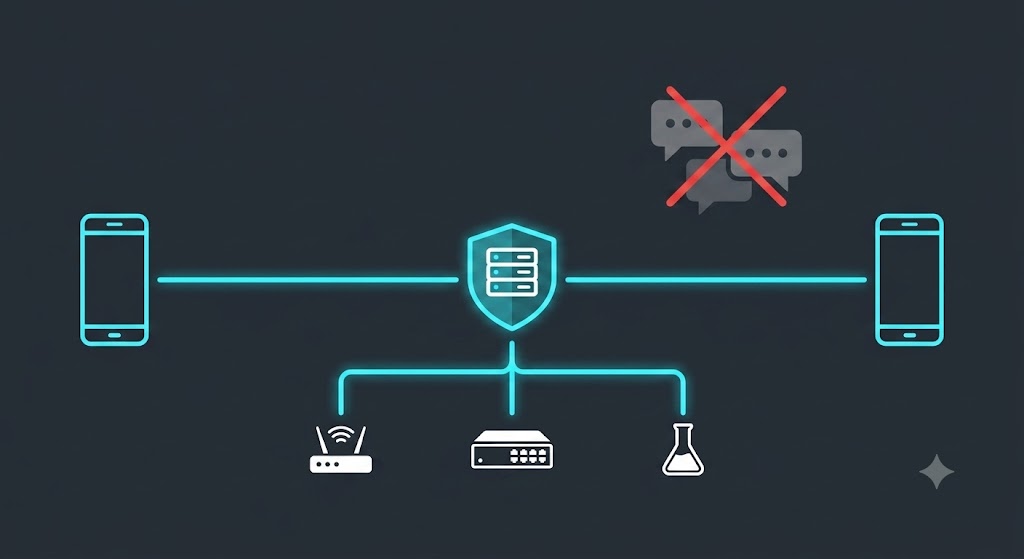
My network agent now lives in my pocket. It talks to my lab, runs my tests, listens to my voice, and looks at my photos — and not one byte of it touches Slack, Discord, Webex, or anybody else’s cloud.
This is the story of the last few weeks of building NetClaw Mobile: from an emulator that Claude Code drove entirely by itself, to a friend in another city holding a real Android phone, to an iPhone talking to that Android phone through my Border, to sending a photo from my hand into a CML lab and getting an answer back.
The thing that was bugging me
Every “ChatOps” story ends the same way. You build something clever, and then you bolt it onto Slack. Or Teams. Or Discord. Or Webex.
And the moment you do that, your network automation conversations — the ones containing your topology, your device names, your interface states, your outage post-mortems — are living in somebody else’s datacenter, subject to somebody else’s retention policy, readable by somebody else’s admin console, and monetizable under somebody else’s terms of service.
I didn’t want a bot in a chat room. I wanted a direct, private, encrypted line between my phone and my own agent, with nothing in between. No relay. No broker. No third party. No “integration.”
So that’s what we built.
Step one: an emulator that Claude Code drove itself
The first version never touched real hardware. I installed the Android SDK and spun up an emulator, and then — this is the part I still find remarkable — Claude Code drove the whole thing.
Not “generated some code and handed it to me.” It built the debug APK, installed it onto the running emulator, launched the activity, read logcat to confirm the app reached topResumedActivity without a Dart exception, watched the camera permission dialog render, and iterated when things broke.
When the release build needed R8 minification, it wrote the ProGuard keep rules, built, and checked the artifact. When the Android 11+ package-visibility rules silently hid every speech recognition service — a bug where the microphone button simply did nothing, no prompt, no error — it found the missing <queries> declaration and fixed it.
The emulator got us a long way. But an emulator has a synthetic camera that renders a test pattern, no enrolled fingerprint, and no real microphone. There is a hard ceiling on what it can prove.
Step two: a real phone, in someone else’s hands
The first real device test was Justin on Android — a real phone, on a real cellular network, in a different place, holding an APK I’d sent him and a QR code I’d generated.
This is the moment that matters, because it’s the first time the system had to work without me able to touch anything. He tapped the APK. Android warned him about installing from an unknown source. Play Protect warned him again. He installed it anyway, opened the app, and pointed his camera at a QR code on his screen.
His phone generated an EC P-256 keypair inside its hardware keystore — a private key that has never left that device and that the app has no code path to export — presented the single-use enrollment token, and my Border pinned his public key to a brand new member row.
Then he asked my network a question, and my network answered him.
Real-hardware testing found things no amount of code review would have. The microphone bug above came from Justin reporting “the microphone option isn’t working.” Reconnection leaks, stale answers after a dropped connection, device labelling at enrollment — all of it surfaced from real phones on real networks, and all of it got fixed.
Step three: the iPhone
Then I brought up iOS on my own iPhone, and the first real compiler run immediately found two things that had been invisible for weeks.
The Secure Enclave plugin and the X.509 certificate builder — both written entirely without a Mac — had never actually been added to the Xcode project. Zero file references. The build failed with “Cannot find EdgeIdentityPlugin in scope.” And the deployment target was still on the Flutter template’s iOS 13, which Firebase’s Swift packages refuse.
Fixed both, and iOS came alive. Same Dart codebase, same protocol, different hardware root of trust: on Android the key lives in the Android Keystore, on iPhone it lives in the Secure Enclave. Face ID on one, fingerprint on the other. The Border doesn’t care — it just knows that whoever is talking to it can sign a challenge with the exact key it pinned at enrollment.
Step four: iPhone to Android, through the Border
Here’s where it stopped being a phone app and started being a federation.
My iPhone and Justin’s Android are both enrolled as node_type='edge' members of my risk. They don’t talk to each other. They each hold a private, mutually-authenticated, TLS-encrypted WebSocket to my Border — and the Border routes between them.
A message originating on the iPhone reaches the Android handset because my Border explicitly pushed it there. No relay service. No message bus in Virginia. Two phones, one Border I own, and a protocol.
Push, in both directions
This is the part I’d underestimated how much I’d enjoy.
Phone to Border works: you type or speak a question, it goes out as n2n/edge/ask, my Border runs an agent turn, fans the work out to whichever risk member owns that capability, and pushes the finished answer back as n2n/edge/ask_result.
Border to phone works too, and it’s deliberately not a firehose. There is exactly one code path that can push to a handset — an explicit operator or agent action. No ordinary channel traffic is ever mirrored to a phone. When I want my agent to tell me something, it tells me. When I don’t, my phone is silent.
Both directions ride the same live encrypted channel. (OS-level notifications for when the app is fully closed are the next piece of work — right now the channel has to be live. That’s a Firebase/APNs configuration step, not a protocol one.)
Actual work: CML and pyATS, from a phone
Demos are easy. Here’s a real one, timestamped from the logs.
I typed “check the CML lab R1 interfaces, test them and report back” into a phone. What happened next:
13:04:33 — the Border accepts the ask over the edge WebSocket and negotiates capabilities
13:04:46 — cml-lab-lifecycle completes on the cml risk member
13:04:59 — the router selects pyats-health-check, dispatches to the pyats member, and writes a GAIT audit record
13:06:10 — pyATS returns success
13:06:46 — a 1,583-byte answer lands on the handset
Two minutes and thirteen seconds, phone to lab to phone, with a full audit trail for every delegation. Not a canned response — a real CML lab, really booted, really tested with pyATS, from a device in my hand.
Voice, on both platforms
Typing CLI-adjacent questions on a phone keyboard is miserable, so voice input works on both Android and iPhone. You hold the mic button, say what you want, and it transcribes on the device before anything is sent.
That detail matters more than it sounds. The audio never leaves your phone. There’s no speech-to-text API in the middle, no vendor transcript, no recording sitting in a bucket. The phone turns your voice into text locally, and only the text goes out over the encrypted channel.
Photos, into the lab
And then the one that genuinely made me grin: you can take a photo and send it to the lab.
Point the camera at a whiteboard topology, a cabling run, a console screen, an error on a device face — snap it, attach it, ask about it. The image rides the same encrypted NCFED channel as everything else, straight to my own Border, where my own agent looks at it.
Capture works in both directions, too. The Border can request a capture from an enrolled device — and every capture type has an individual toggle in the app. Turn photo capture off and the Border can’t even discover it as a possibility, let alone request one.
The part that actually matters: NCFED
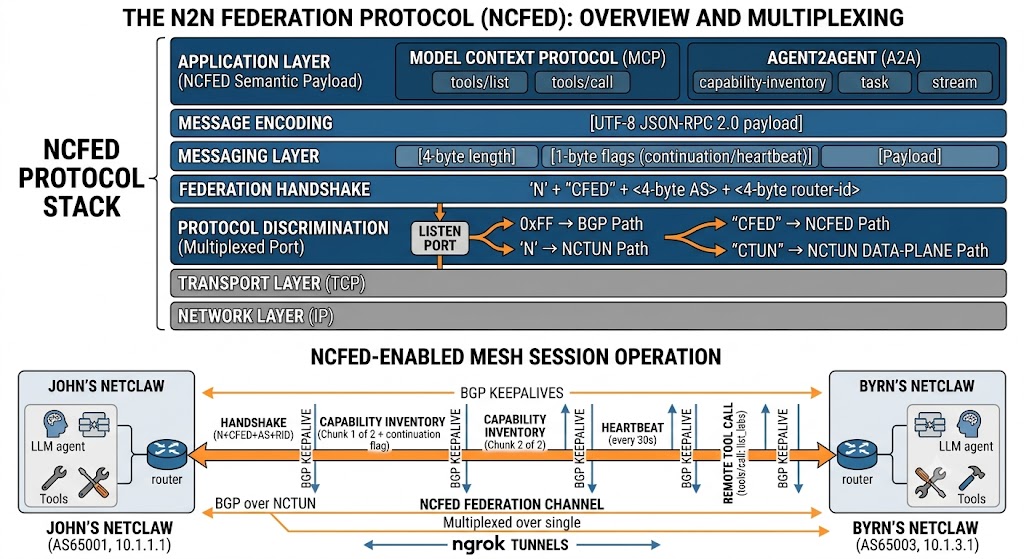
All of the above rides on NCFED — the NetClaw Federation protocol, which is now an IETF Internet-Draft.
Here’s what that buys you, concretely:
Direct. Your phone dials your Border at your domain. There is no intermediary service, no vendor relay, no account with anyone.
Encrypted. A domain-verified TLS WebSocket. The app validates the certificate and has no bypass — a phone enrolled for your Border will not complete a handshake against anything else.
Hardware-rooted identity. Secure Enclave on iPhone, Android Keystore on Android. The private key is unexportable by design.
Trust on first use, then pinned. Single-use enrollment tokens, hashed server-side. Every later connection must sign a challenge with that exact key.
Revocable from your side. Lost phone? Remove the member. You never need the device back.
Audited. Every request a phone originates lands in the GAIT audit trail, attributed to that member.
Least privilege. An enrolled phone is a peer that can ask questions, not an admin console. No shell, no filesystem, and it cannot enroll anyone else.
No Slack. No Discord. No Webex. No Teams. No third-party bot framework, no webhook relay, no SaaS in the path. Your phone, your Border, your network.
Try it yourself
It’s not on the app stores yet — that’s in progress on both, and Google Play’s twelve-testers-for-fourteen-days requirement means it’ll be a few weeks. In the meantime it’s sideloadable today, and it’s a generic client: no hostnames, no credentials, nothing baked in. It binds to whichever Border enrolls it. Point it at your own.
In the repo under mobile/netclaw-mobile/:
SIDELOAD.md — build it and get it onto a device. Android is an APK you can send by any means; iOS needs TestFlight, an Ad Hoc build, or a cabled Mac.
MOBILE-ONBOARDING.md — the Border side. Issue an enrollment token, verify the pinned key, revoke when you’re done. Read the security model here first.
TESTER-INSTRUCTIONS.md — a copy-paste handout if you’re sending a build to somebody else.
You’ll need Flutter 3.44.8, JDK 17, and the Android SDK — plus Xcode and your own signing team for iOS.
Where this goes
What started as “can I check my lab from my phone” turned into something I didn’t expect: a general-purpose, protocol-level answer to the question of how an autonomous agent and a human should talk to each other when neither one wants a middleman.
The phone is just the first edge node. The protocol doesn’t care what’s on the other end.
Huge thanks to Justin for being the first person outside my house to trust an APK from me and tell me honestly what was broken.
Ask a network AI agent about OSPF and it answers from training data. Ask it what’s on your network right now and — if it’s built right — it goes and looks. But ask it about your design document, the vendor install guide for your platform, the customer standard that says which BGP communities mean what in your shop, and until this week NetClaw had nothing to reach for.
That gap is now closed by BISQUE — the Base of Ingested Semantic Queries for Unified Embeddings — NetClaw’s fully offline, free, local document knowledge base. Yes, it’s a backronym. No, we’re not sorry: the tastiest thing you can make from claws is a bisque.
Four kinds of knowing
The design started from a distinction that sounds academic and turned out to be the whole feature. An agent has four knowledge sources, and they must never blur:
What it knows — parametric knowledge from training. Fine for "what is OSPF."
What is true right now — live MCP calls (pyATS, NetBox, and friends). The only acceptable source for current network state.
What it has experienced — its own Memory MCP: facts it learned, decisions, session history.
What it has been given — and this is the new one: documents users deliberately hand it. Install guides, RFCs, vendor configuration guides, design docs.
BISQUE holds only category four. It is physically separate from Memory — separate directory, separate database, separate tools — and neither system ever writes into the other. We rewrote NetClaw’s SOUL and skills so it can articulate which source a question calls for, and the validation suite checks the routing logs for zero cross-source violations.
Retrieval is a tool, not a pipeline
Most RAG you’ve seen is a pipeline: every question gets embedded, top-k chunks get stuffed into the prompt, generation proceeds whether the chunks helped or not. BISQUE’s retrieval is agentic: rag_search is a tool the agent chooses to call — or not — and it can critique its own results and re-query, bounded by an explicit three-round budget so it can’t spiral. Under the hood it’s hybrid search — dense vectors in ChromaDB plus BM25 keyword scoring, fused and reranked by a local cross-encoder — because networking documents are full of exact tokens (router bgp 65001, part numbers, RFC numbers) that pure semantic search fumbles.
Two rules keep it honest. Every claim that comes from a retrieved document carries a citation — title, section, page, ingest date — and a claim it can’t cite, it doesn’t make from BISQUE. And when the corpus simply doesn’t contain the answer, NetClaw says so. Honest misses over hallucinated hits, 100% of the time.
Free and offline, on purpose
No cloud embedding APIs, no paid rerankers, no hosted vector database. Local embedding models, local reranking, everything under one directory. After the initial model download the whole thing works air-gapped — which matters to exactly the kind of network operators NetClaw is for. Ingestion takes PDFs, modern Office formats, HTML, and URLs; a LibreOffice fallback handles the legacy .doc/.xls fossils every enterprise still has. Users own the corpus: every document is listable, inspectable, deletable, re-indexable.
There’s one carefully fenced exception to "documents only": an opt-in snapshot tool can vectorize a chosen piece of live network output into a timestamped collection — for "compare this to last month" workflows — but it is never automatic, never in a heartbeat, and its age is always displayed. Live state stays the job of live tools.
First bowl of bisque: real numbers
The first real document went in this week — my own book, uploaded as a PDF attachment in Slack:
212 pages → 389 chunks, registered, embedded, and queryable in about 2 minutes 20 seconds end to end (the spec’s bar was 5 minutes for 100 pages)
First cited answer sourced from the book seconds later, retrieval latency ~800 ms per hybrid search
The agentic loop was visible in the retrieval log: two sub-queries came back at 0.96–0.998 confidence, one weak query got self-flagged as low confidence — the self-critique working on real traffic
The honest-miss test: asked about vendor tech that isn’t in the book, every retrieved chunk scored below 0.03 and was flagged low-confidence — so the agent said "not in my knowledge base" instead of making something up
Every ingest call was inspected and allowed by the DefenseClaw guardrail on the way in
The unplanned durability test
The same week BISQUE shipped, we upgraded the host straight through two Ubuntu releases to 26.04. The upgrade deleted the entire Python package layer out from under every MCP server — a genuinely rude afternoon — and when the dependencies were reinstalled, the knowledge base came back untouched: registry, vectors, retained originals, retrieval logs. State that lives in one well-defined directory survives what happens to the interpreter around it. Not a test we’d have volunteered for; nice to pass it anyway.
What’s next
The evaluation harness ships with a golden-set format but no fixture documents — the corpus should be real. So the next step is unglamorous and important: loading the bookshelf. RFCs, the vendor guides we actually use, the design docs that explain why the network looks the way it does. An agent that can check what it’s been given is only as good as what you give it.
When we first federated two NetClaws over the public internet, the identity of a peer was, embarrassingly, just a string it typed on the wire: as65001-4.4.4.4. If you knew a claw’s tunnel address and its AS/router-id, you could be that claw — and everything the two agents said to each other, every delegated task and piece of network inventory, crossed the internet in the clear. Our own IETF Internet-Draft said so out loud in its Security Considerations. This week we fixed it.
What we built
Claw Certification gives every federation channel TLS encryption and real cryptographic identity, in two flavours:
Domain-verified. If you own a DNS name, your claw gets a publicly-trusted Let’s Encrypt certificate for it and peers verify you against the web PKI. The trick that makes this practical: issuance uses the DNS-01 challenge, so it works behind a constantly-changing ngrok tunnel with no inbound reachability and no A record. Your identity binds to the name, not the endpoint — the endpoint can churn all it likes.
Pinned. No domain? Your claw presents a self-signed key that the peer pins on first contact (trust-on-first-use), confirmed the same out-of-band way consent already worked. Still encrypted, still un-spoofable afterward.
Authentication is mutual and bound to the specific TLS session (RFC 5929 channel binding), so an on-path attacker can’t relay a proof. Inside a “risk” of claws, the Border is now a certificate authority: members cryptographically verify that the hub they dialed is the legitimate one — the last direction of trust the draft flagged as missing. And every credential rotates itself before expiry with an overlap window, so nothing ever drops because a cert aged out.
The satisfying part
We validated it end to end on a real domain — netclaw.automateyournetwork.ca — issuing a genuine Let’s Encrypt certificate through GoDaddy’s DNS API. That surfaced a real-world wrinkle worth sharing: GoDaddy’s new Personal Access Tokens authenticate with Bearer, which the standard ACME client’s GoDaddy plugin doesn’t speak (it wants the legacy key/secret header). Rather than tell operators “go generate a different kind of key,” we shipped a tiny hook so the token they already have just works. Small thing; exactly the kind of friction that decides whether security actually gets turned on.
Honest engineering notes
A few things went the way good engineering is supposed to go: we caught, by testing on real sockets instead of trusting the happy path, that the channel-binding primitive we first reached for isn’t available on our Python version — so we switched to one that is, with the same security property. We kept the whole feature behind a default-off switch so it couldn’t destabilize a live mesh while it was being built. And because we made certificates a prerequisite for external federation, we built the migration first: one command, preserves all your state, and an unpatched peer gets a clear “run the patch” message instead of a silent failure.
We cut over for real
This isn’t a design doc — the first claw is live on it. netclaw.automateyournetwork.ca now holds a genuine Let’s Encrypt certificate, federation runs certificate-authenticated, and the credential auto-renews. The migration even caught its own bug: the patch installer wrote config to the wrong env file and the daemon didn’t pick it up — found it, fixed it, shipped the fix. That’s the system working as intended: change, verify, correct, in the open.
Try it
Existing operators: scripts/patch-claw-certs.sh. New to peering: see the federation guide. Certificates in, cleartext out.
Written collaboratively by John Capobianco and Claude, with a security fix contributed by Josh (TunnelMind).
For a while now, two NetClaw instances on opposite sides of the internet have been able to find each other. They peer over BGP through ngrok tunnels — real eBGP sessions, real identity routes, a real mesh directory — and each one shows up as a glowing node in the other’s 3D HUD. It’s a genuinely fun demo: two AI network engineers, each running someone else’s lab, exchanging /32s across the planet like it’s nothing.
But that mesh only ever answered one question: who is out there. It could not answer the far more interesting one: what can they do, and can I use it?
Today it can. We’re shipping N2N Federation — NetClaw-to-NetClaw — and with it a new protocol, NCFED, that turns the mesh from a map of who’s online into a working federation of AI engineers that can discover each other’s skills, invoke each other’s tools, and talk to each other’s agents. Safely. With consent on both sides, default-deny authorization, budgets, a kill switch, and an audit trail on every hop.
This is the post about how it works, why it needed a new protocol, and why we think it’s a bigger deal than it looks.
The itch
Picture three operators. John has a Cisco Modeling Labs server and a pyATS testbed. Nicholas has CML too, but also a Meraki org and a stack of automation John’s never written. Byrn has a Batfish setup and a Forward Networks digital twin John would kill for.
They’re already mesh-peered. John’s claw can see Nicholas’s claw and Byrn’s claw in the HUD. So why can’t John just ask his own NetClaw, “hey, does Nicholas have CML? Can you list his labs? And while you’re at it, ask Byrn’s claw why its OSPF area 0 keeps flapping”?
Nothing about that is science fiction. Each claw is already an agent with tools. Each pair already has an authenticated channel. The only thing missing was a protocol to carry capability inventories, tool calls, and conversations between them — and a trust model so nobody accidentally hands a stranger the keys to their lab.
Why a new protocol?
The first instinct is to reach for something off the shelf. There are two obvious candidates, and we looked hard at both.
MCP (Model Context Protocol) is what NetClaw already speaks internally — 111 integrations, all MCP servers, all tools/list and tools/call. It’s perfect for “run this tool and give me the result.” But it’s request/response by nature. It has no vocabulary for a long-running delegated task, no streaming, no notion of “an agent asking another agent to think about something.”
A2A (Agent2Agent) is purpose-built for exactly that: agent cards for capability discovery, a task lifecycle (submitted → working → completed), streaming messages. It’s a great semantic fit. But its transport binding assumes HTTPS and a well-known discovery URL per agent — which would mean every NetClaw exposing a new public endpoint, on top of the ngrok tunnel it already has. That breaks one of our hard rules (no new inbound exposure) and doubles the endpoint churn every operator already fights with free-tier ngrok.
So neither was a drop-in. But here’s the thing that made the decision easy: both A2A and MCP are JSON-RPC 2.0 under the hood. The disagreement between them isn’t the wire format — it’s the semantics and the transport binding. And we already own a transport: the authenticated mesh channel.
That’s NCFED. We took the semantics we wanted from each — MCP’s tools/call shape for deterministic tool invocation, A2A’s agent-card/task/stream shape for discovery, skill delegation, and chat — and bound them to a channel multiplexed over the mesh port we’re already using for BGP. Federation now works everywhere BGP works, with zero new open ports.
How NCFED rides the mesh
The NetClaw mesh daemon already does protocol discrimination on its listen port. When a TCP connection comes in, it peeks the first byte: 0xFF is a BGP marker, N is the start of our tunnel magic NCTUN. We added a third path. After the N, we read four more bytes: CTUN is the existing data-plane tunnel; CFED is a federation channel.
That’s the whole trick. No new port, no new listener, no new ngrok tunnel. A federation channel is just another kind of connection to the same endpoint BGP already dials, disambiguated by five bytes. A NetClaw running the old code never sends NCFED, so it peers over BGP exactly as before and simply shows up as “not federated.” Backwards compatibility falls out for free.
The one flag that matters is continuation — a capability inventory with two hundred skills doesn’t fit in one frame, so large messages chunk, and BGP keepalives interleave between chunks. A heartbeat frame every 30 seconds keeps the channel honest. Identity is the BGP identity — as65001-4.4.4.4 — which means federation survives the thing that breaks everything else in this world: ngrok handing you a different endpoint after a restart. Your identity is your AS and router-id, not your address.
The four things it unlocks
1. Capability discovery. Once two operators mutually consent, each claw advertises a signed inventory: its skills (name + description), its MCP servers and their tool names, and coarse capability badges derived from what’s installed — CML, pyATS, Meraki, Batfish, Forward. Now John can ask his own claw “what can Nicholas do that I can’t?” and get an answer instantly from cached inventory, with a freshness timestamp. The inventory is built with a hard guard: it is scanned against every value in .env before it leaves the machine, and advertisement aborts if a secret would leak. Names and descriptions travel. Credentials, device addresses, and testbed contents never do.
2. Remote invocation. “List the labs on Nicholas’s CML.” John’s claw sends a tools/call over the channel. Nicholas’s claw checks its allowlist — default-deny, so nothing runs unless Nicholas explicitly granted John that specific tool. If the grant requires approval, Nicholas gets a prompt on whatever channel he’s using (Slack, Webex, CLI) and the request waits, expiring if he doesn’t answer. If it’s allowed, Nicholas’s claw runs the tool locally, with his own credentials and his own security policies, and returns only the result. Deterministic tools execute via a direct MCP stdio call — no LLM, no token cost. Skills delegate to Nicholas’s gateway agent, which reasons under his model, his DefenseClaw guardrails, and his budget. Every attempt — allowed, denied, approved, expired, timed out — lands in an audit record on both sides.
3. Claw-to-claw chat. “Ask Byrn’s claw why its OSPF area 0 is flapping.” The question relays to Byrn’s agent, which answers with its own tools and its own knowledge, and the reply streams back attributed to Byrn’s claw — John always knows he’s reading Byrn’s answer, not his own claw’s. Per-peer enable, rate-limited, budgeted, transcribed for both operators.
4. The HUD, alive. Every remote claw node in the 3D dashboard is now expandable. Click Nicholas’s node and it unfolds: his skills, his MCP tools, his capability badges, how fresh the inventory is, and a chat box wired straight to his agent. A federated claw glows differently from a merely-peered one. Federation state updates live as consent, inventory, and severance flow through.
The trust model, because this is the scary part
Letting another operator’s AI invoke tools on your machine is exactly as alarming as it sounds, so the guardrails are not optional and not bolted on:
Mutual consent per peer. Nothing — not even a capability list — crosses until both operators opt in. Confirm your peer’s AS and router-id out of band first; you already coordinate ngrok endpoints in Slack, so you’re already doing this.
Default-deny invocation. No grant, no execution. Grants are per-peer and per-tool, with an optional human-approval gate for anything sensitive.
Budgets and rate limits. A peer using your claw draws against a per-peer daily budget of requests and tokens, on top of a per-minute rate limit. Nobody runs up your bill.
No secrets, ever. Inventories and results carry capability names and outputs — never .env contents, credentials, or testbed data. Enforced at build time and tested as an invariant.
Remote results are untrusted input. A result that says “now run rm -rf” is data, not a command. Your claw reasons over it; it never executes it.
A real kill switch. Sever a peer and N2N stops in under ten seconds — capability exchange, invocation, chat, all of it — while the BGP session stays up and routes keep flowing. Federation and connectivity are decoupled on purpose.
Dual-side audit. Both claws record who asked, what ran, when, and what came back.
Where this goes
Here’s why we think this is bigger than a neat trick. Every NetClaw is a specialist shaped by whoever runs it — their vendors, their labs, their hard-won skills. Federation makes that specialization composable without anyone surrendering control of their infrastructure. A CML expert’s claw can drive labs for a team that has none. A shop with a Forward Networks twin can answer path-analysis questions for peers who don’t. An on-call engineer at 3 a.m. can ask a peer’s claw — the one that actually knows that network — instead of paging a human. And it’s all mediated by agents that speak the same protocol, enforce the same consent, and write the same audit trail.
We built this the way we build everything in NetClaw: spec first, then plan, clarify, tasks, and implementation, with the whole thing tested on a two-daemon loopback before it ever touched the live mesh.
The mesh used to tell you who was out there. Now it tells you what they can do — and lets you, carefully and on both operators’ terms, actually use it.
NetClaws, assemble.
Written by John and Claude. NCFED, the N2N federation layer, and the HUD federation view were designed and implemented collaboratively — spec through deploy — as feature 052.
Part 2: Making the mesh hold — it actually works now (feature 053)
The post above ends with a working demo. Then we reached for something bigger — have one operator’s claw rebuild another operator’s entire CML lab over N2N — and the whole thing fell apart. Not because the protocol was wrong, but because the operational envelope was paper-thin. Nearly every session broke on one of: a long remote operation dropping mid-flight, a dead channel after a peer restart, an ngrok endpoint that moved on restart, a version difference between claws, or a timeout mismatch swallowing a completed answer.
That’s the tell: the protocol was sound; the resilience wasn’t there yet. Getting a working answer meant a human babysitting every restart. So we wrote spec 053 — reliability and ergonomics only, with the proven NCFED core frozen — and built six things.
1. Async task delegation — the headline. Long remote operations are no longer one blocking call. You submit a task and get a task_id in seconds; the peer runs it in the background; you poll short status calls and fetch the result when it’s done. No single call is ever long enough for ngrok to kill it.
> "Have Nick's claw recreate my NetClaw-Full-Topo lab in his CML."

n2n_delegate(peer="as65007-7.7.7.7", target_name="cml-lab-lifecycle", input="<10-node build spec>")
  => { task_id, state: "submitted" }        # returns in ~2 seconds

n2n_task_status(task_id)  => working - "nodes 4/10"
n2n_task_status(task_id)  => working - "links 12/12, pushing configs"
n2n_task_result(task_id)  => completed - "lab up, OSPF adjacency formed"
Task state is persisted, so the result survives a channel drop and a daemon restart mid-build.
2. Channel auto-reconnect. A background supervisor watches every federated peer. When a channel dies, it’s detected, the zombie is deregistered, and it re-establishes automatically from persisted consent with bounded backoff. A peer restart heals itself in under a minute, no human action.
3. Endpoint auto-re-announce. When your ngrok endpoint moves on restart, your claw announces the new one to federated peers over the still-live session and they re-dial automatically — validated only over the authenticated session, so it can’t be spoofed. The manual host:port dance in Slack is gone.
4. Capability negotiation. Peers exchange a small capability descriptor in the hello handshake — protocol version, which agent CLI flag they support, which reply shapes they emit — and each side adapts. A claw on an older build degrades gracefully instead of breaking. The –session-key vs –session-id skew that broke a whole afternoon is now just a negotiated field.
5. Robustness hardening. The live hot-patches became first-class, regression-tested requirements: the client always outlasts the server’s own timeouts; reply parsing tolerates a trailing log line after the JSON; the HTTP layer reads the full body even across TCP segments; missing fields return typed errors.
6. Health and one-step setup. n2n_health (and the 3D HUD claw node) show per-peer channel state, last-seen, endpoint freshness, and in-flight tasks with live progress. The old five-step setup collapsed into n2n_connect (add + consent + dial) and n2n_trust (consent + grants + chat).
It actually works — CML and Nautobot across the internet
On the live three-claw mesh — John (AS 65001), Nick (AS 65007), Byrn (AS 65099) — over nothing but N2N federation:
John’s claw asked Nick’s claw about its CML, and got the real answer:
Nick's CML labs - count: 1
Lab                                    State     Nodes
NetClaw OSPF 2R - 20260702-033650Z     started     2
That traveled the full path: John’s claw to the NCFED channel to Nick’s claw running its own CML query with Nick’s own credentials, and back. No shared credentials, no John touching Nick’s CML — pure federation. Nick runs a different model (gpt-5.5) on a different OpenClaw build, and negotiation made the reply come back clean anyway. Byrn’s claw answered a Nautobot query the same way, peer-side under his own policies.
Then we tested the thing that matters most: it survives a reboot. After a full restart, John’s claw came back on the hardened code and both peers re-federated cleanly — Nick at his new address, Byrn at his — channels up, inventories fresh, via a single one-step connect. And as this was being written, John’s claw was teaching Nick’s claw the pyATS testbed for the CML lab they’d just cloned across N2N — one AI network engineer onboarding another, over a protocol that now holds.
What made it trustworthy: tests that fail first
Forty-four automated tests cover the federation layer, most driving two services over an in-memory channel pair, asserting the guarantees — submit returns fast while the op runs long, a result survives a channel drop and a daemon restart, a dead channel self-deregisters, a completed answer is never lost to a timeout mismatch, a pre-053 peer still federates. One of them immediately caught a missing import in the reconnect supervisor that would have silently prevented every auto-reconnect in production. The whole point of hardening is catching the thing that fails quietly.
A community of federated AI network engineers is only as good as its worst 3 a.m. failure mode. Spec 053 is the unglamorous work that turns a great demo into something you’d actually leave running. Three claws, three machines, three different models — discovering, querying, and delegating to each other across the internet, and healing themselves when one blinks. The mesh holds.
Next: an internal-clutch model (iN2N) for focused single-operator claw fleets. But first — the CML lab clone that started all this now completes, cleanly, over the mesh. Feature 053, built spec-through-implement over a live three-claw mesh, with a sharp –session-id catch from Nick and a client-payload PR from Byrn.
Most of what NetClaw does, it does through APIs — gNMI, REST, NETCONF, GraphQL. That’s the right way to automate a network: structured, auditable, repeatable. But real networks are messy, and not everything worth touching has a clean API behind it. Some of the most useful information lives behind a login screen in a vendor’s web dashboard. Some of it lives in an old desktop application that has never had an API at all. So over two features, I gave NetClaw a way to reach both.
Part 1: Teaching NetClaw to Drive a Browser
SDN controllers, in particular, have a habit of putting real operational data — bridge domain status, tenant health, a specific alarm — behind a GUI-only report that the REST API simply doesn’t expose. You can see it in the dashboard. You can’t query it. That’s the gap Chrome DevTools MCP closes.
I integrated the official chrome-devtools-mcp server (built by the Chrome DevTools team) and wrote a skill, browser-gui-inspect, with one non-negotiable rule: read, confirm, and search only — never submit a configuration change. If a task needs to actually change something, that belongs to NetClaw’s proper API-based skills, with their observe → baseline → modify → verify workflow and ITSM change-request gating. The browser is for reading what the API won’t show you, not for sneaking a config push around the guardrails.
The part I actually wanted, though, was Watch Mode. By default the browser runs headless — no visible window, just NetClaw reading the page. But say the word, and NetClaw spins up a real, visible Chrome window instead — wherever NetClaw happens to be running. Ask it over Slack to log into a demo NetBox instance and create a new site, and you can watch it happen, live, click by click. It’s the difference between trusting a report and watching the work.
Getting there took a real bug fix, too — running this live, NetClaw hit a wall because Chrome wasn’t installed in the path the tool expected. Rather than patch around it once, I built Chrome provisioning directly into the installer, so it self-heals on any machine — Linux, WSL2, or Mac — without anyone needing to know where Chrome “should” live.
Part 2: Teaching NetClaw to Drive an Entire Desktop
Browser control solves the web-GUI gap. But some of the oldest, most stubborn tooling in networking and security has no web GUI and no API — just a native desktop application. A legacy Java-based NMS client. A vendor’s Windows-only configuration utility. A terminal emulator with no scriptable interface at all. Browser automation can’t touch any of that, because there’s no browser involved.
That’s where Computer Use comes in — OpenClaw’s own full-desktop automation capability. Instead of a browser, NetClaw now gets a real virtual desktop: Xvfb and XFCE running headlessly on the NetClaw host, driven by xdotool for real mouse movement, clicks, drags, keyboard input, and screenshots. Seventeen actions in total. It’s the same idea as browser control, one layer down the stack — instead of controlling one application (Chrome), NetClaw controls the whole screen.
I wrapped this in a new skill, desktop-gui-inspect, with the exact same golden rule as its browser sibling: reading and confirming state only, never a side door around the real change-management workflow. And it gets the same Watch Mode, too — a VNC/noVNC live-viewing service so an operator can watch NetClaw operate the virtual desktop in real time, or take over the mouse and keyboard themselves if a step needs a human (an interactive first-run license dialog, say).
Building this one live surfaced two real bugs before they ever shipped. First: the virtual desktop’s live-viewing service, by default, listens on every network interface — not just localhost. That’s full desktop control exposed to anyone who can reach the port. I caught it with a plain ss -tlnp check during testing, and the installer now locks it to loopback-only automatically, verifying the fix on every install rather than just hoping it stuck. Second: the installed skill’s own action scripts weren’t executable out of the box — every single click or keystroke failed with a permission error until that got fixed too. Neither of these is a hypothetical “best practice” — they’re bugs a live desktop, with a real terminal window and a real typed command, exposed in the first ten minutes of testing.
The Pattern
Two features, one shape: give NetClaw a controlled way to see something the APIs can’t reach, make sure it can never use that access to make an unaudited change, and always give the human a window to watch — or take the wheel. Browser control and desktop control aren’t a replacement for API-driven automation; they’re the fallback for when a legitimate answer only exists on a screen, wherever that screen happens to live.
NetClaw — my AI network engineer — just gained a body. Not a metaphorical one. A literal, walkable, three-dimensional one, built inside Unreal Engine 5.8.
Here’s what that actually means: I pointed NetClaw at a real lab running in Cisco Modeling Labs (CML). NetClaw used pyATS to gather live device state from that lab — the routers, the switches, the links between them, their health. Then, using nothing but the Model Context Protocol (MCP) and Unreal Engine 5.8’s own built-in MCP server, NetClaw reconstructed that exact topology as a fully rendered 3D scene — devices as objects in space, links as glowing connections, colors mapped to device type and health, laid out automatically with a force-directed algorithm and centered on the map.
No human touched a single actor in the scene. No one dragged a node, ran a cable, or set a color. NetClaw talked to three separate systems — CML, pyATS, and Unreal Engine — over MCP, and built the world itself.
This is a new composable skill for NetClaw: ue5-network-viz. And it’s not a one-off demo — it’s a reusable pipeline. Any topology NetClaw can see through CML, pyATS, gNMI, SuzieQ, or any of its other network-data MCP servers can now be rendered as a living 3D scene in Unreal Engine.
Why This Matters — The Bigger Picture
Network diagrams have looked the same for 40 years: boxes and lines on a 2D canvas — a whiteboard, a Visio file, a NetBox topology view. They’re static the moment they’re drawn, and they go stale the moment someone racks a new switch or re-patches a link. We’ve been representing something inherently physical and spatial — racks, cables, rooms, buildings, campuses — as flat, lifeless diagrams.
That’s what changes here.
Once a network exists as real objects in 3D space instead of shapes on a page, a whole category of things becomes possible that was never possible with a flat diagram:
Fly-throughs. Don’t squint at a topology export — fly through your network like a level in a game, camera gliding between core, distribution, and access layers.
Live traffic flow visualization. Imagine packets rendered as moving light along the links, real interface utilization shown as flow intensity, congestion visibly building on a saturated trunk in real time.
Color and light as telemetry. Device and interface health rendered as actual color and glow in a 3D scene instead of a row in a spreadsheet or a red dot on a dashboard.
Rack and elevation views, to scale. Generate an accurate 3D rack elevation automatically from live inventory data — see exactly what’s mounted where, without opening a spreadsheet.
Walkable wire maps. Every cable, every port, spatially accurate and traceable by literally walking along it.
First-person exploration. Drop into first-person view and stand inside your own network — walk the server room, walk the campus backbone, walk a topology that doesn’t even physically exist yet because it’s still in a lab.
And critically — this doesn’t stop at lab environments. The exact same pipeline that rebuilt this CML lab as a 3D world can rebuild a real, production network the same way: pull live state from real devices, and render a true 3D digital twin of a real data center, campus, or site. Virtual labs and real infrastructure become the same kind of object once they’re described the same way — as data flowing through MCP into a 3D engine.
We are not far from the point where “monitoring the network” means literally walking through it.
For the Technically Curious — Hurdles Faced
I want to be upfront about something before diving into the technical details: this took longer than it should have, and it wasn’t because the integration itself was hard. It was because I was building this on a PC that started showing real instability under the combined load of Unreal Engine 5.8, live rendering, and an AI agent hammering it with MCP tool calls. This is a heavy workload — a full game engine, a live editor session, real-time actor spawning and transform updates, screenshot capture, all while a separate process (NetClaw) is issuing dozens of MCP calls per topology build. My machine crashed, repeatedly, mid-build, more than once wiping out an in-progress scene and forcing a full restart of both Unreal Engine and the session. If you attempt this yourself, budget real headroom on GPU and system stability — this is not a lightweight integration to run on marginal hardware.
Setup, Step by Step
For anyone who wants to reproduce this, here is the exact order that worked:
Create an Epic Games account and install the Epic Games Launcher. This is the gate to everything else — Unreal Engine itself is distributed through the launcher, not as a standalone installer.
Download and install Unreal Engine 5.8 through the launcher. This is a large install — allow real time and real disk space for it.
Install the MCP Plugin — and note, there are two of them. Unreal Engine’s plugin ecosystem currently has more than one MCP-related plugin available; make sure you install the one that exposes the actual ModelContextProtocol server subsystem (the built-in MCP integration), not a third-party alternative with different tool coverage. Enable it from Edit > Plugins inside the editor and restart when prompted.
Find “All Tools” in the plugin’s settings and enable it for full Read/Write access. By default, the MCP plugin exposes a curated, limited subset of tools. There is a specific “All Tools” toggle that unlocks the entire tool surface — all 55 tools — with read/write access, instead of a read-only or partial subset. Without flipping this on, most of what NetClaw needed to do (spawning actors, setting transforms, applying materials) simply is not available to call.
Start the MCP server from the in-editor console with:
ModelContextProtocol.StartServer
Which produces output like:
LogModelContextProtocol: Starting MCP server on port 8000 (override with -ModelContextProtocolPort=N).
LogModelContextProtocol: Warning: Data transmitted via this plugin to your connected LLM service is Licensed Technology under the UE EULA. You are responsible for ensuring your LLM provider does not use it as training input. See Section 6(e) of the UE EULA for full terms.
LogHttpServerModule: Starting all listeners...
LogHttpServerModule: All listeners started
That EULA warning is worth actually reading — it’s a real legal note about how data flowing through this plugin to your LLM provider is treated, not boilerplate to skip past.
The Real Bugs — What Actually Broke, and Why
Once the server was up and NetClaw could talk to it, the real work started, and it surfaced a run of genuine bugs that no amount of reading documentation would have caught — they only showed up under live, repeated use against real UE5.8 builds:
Tool-calling convention was wrong. The obvious assumption — call tools using a fully-qualified toolset.method_name string — silently failed. Some builds only accept the short tool name. Worse, the failure came back looking like a generic “Unknown tool” response that could be misread as a successful no-op rather than a hard failure, so the very first version of this integration was quietly failing every call while reporting green.
Batch scripting isn’t universal across UE5.8 builds. The fast path for building a topology was supposed to be a single batched execute_tool_script call that spawns every actor at once using Python inside Unreal. On some UE5.8 builds, that path is locked down and forbids import unreal inside the script entirely — the fast path simply cannot run. The fix was to detect that failure mode and fall back automatically to a slower, proven per-actor build path, rather than assuming one code path works everywhere.
The HTTP transport would hang on a connection that was already done. Some MCP responses come back over a Server-Sent-Events stream that stays open as a keep-alive even after the real answer has already arrived. The original client waited for the entire HTTP body to close before returning — which meant it could sit there for the length of a full timeout even though the actual answer showed up in under half a second. The fix was to read the stream line by line and stop the instant a complete JSON-RPC object is seen, rather than waiting for the connection itself to close.
Setting a transform could silently wipe fields you didn’t touch. Calling the actor-transform tool with, say, only a new scale value, could reset that actor’s location back to the world origin on some builds — despite the tool’s own documentation claiming untouched fields are left alone. The only safe pattern found was to always pass location, rotation, and scale together, every single call, never partially.
Nothing re-centered the topology as a whole. The force-directed layout algorithm kept individual nodes from overlapping and kept them within bounds, but nothing corrected the topology’s overall center of mass — so a build could quietly drift off the map origin over successive layout passes. A centroid-correction step after layout fixed this.
A false-positive success check. A verification step used a pattern like sum(device_counts) or len(expected_specs) — which is a classic Python trap: if the real count comes back as zero (a genuine failure), the “or” silently falls back to the expected count and reports success anyway. Removed the fallback so a real zero stays a real, visible zero.
Some tool responses come back as strings, not structured data. The tool for finding existing actors in the scene returned a raw JSON string instead of an already-parsed list/dict on certain builds — meaning code that expected to iterate a list would instead iterate the characters of a string. The client now tolerates both shapes.
The package’s own import chain was broken from day one. Every submodule inside the skill used plain absolute imports, while the package’s own __init__.py used relative imports — meaning the documented entry point, from workspace.skills.ue5_network_viz import ..., had never actually worked, in any prior session, before this pass. Fixed with a dual-mode import shim and verified both the package-style and path-style import actually succeed.
None of these are exotic bugs. They’re the ordinary, unglamorous cost of integrating against a real, evolving third-party plugin surface rather than a stable, versioned API — and every one of them only became visible by actually running the thing against a live editor, over and over, through crashes and restarts, until it worked cleanly end to end.
From Lab to Your Own Setup
If you’re running NetClaw already and want this capability, there are two paths in:
Existing installs — pull the update and run the UE5 patch installer, which drops the new ue5-network-viz skill and MCP server registration into your existing NetClaw workspace without touching anything else.
Fresh installs — it’s included by default; just make sure you complete the Unreal Engine 5.8 setup steps above first.
Either way, the remaining steps are the same: fill out the UE5_MCP_URL entry in your .env file (defaults to http://127.0.0.1:8000/mcp, matching the port the editor’s MCP server starts on), make sure Unreal Engine 5.8 is running with the MCP server started, and you’re ready to interface with it directly through NetClaw.
From there, it’s just another composable skill. Ask NetClaw to pull a topology from CML and pyATS and render it in Unreal Engine, and it chains the calls itself — gather state, lay out the graph, spawn the actors, apply the materials, frame the camera, and hand you back a live 3D scene built from real data. The same composability that lets NetClaw chain gNMI, SuzieQ, GitLab, or PagerDuty into a single conversation now extends into a full 3D engine.
What’s Next
This is Day 1 of representing networks in three dimensions instead of two. Traffic-flow visualization, live health-driven color and light, automatically generated rack and elevation views, walkable wire maps, first-person exploration of your own infrastructure — all of it sits on top of the same foundation shipped here. The hard part — proving an AI agent can reliably drive a real 3D engine over MCP, using real network state, with zero human placement — is done.
I’m genuinely proud of this one. Full code and the incident log of every bug above is in the pull request on GitHub.
NetClaw + IP Fabric: Network Assurance Meets AI-Powered Automation
I’m thrilled to announce a new integration that brings IP Fabric’s powerful network assurance capabilities directly into NetClaw through the official IP Fabric MCP Server. This integration represents a collaboration nearly a decade in the making.
A Partnership Built on Trust
This integration was developed in collaboration with Daren Fulwell, Field CTO at IP Fabric, and myself. Our professional partnership spans almost a decade, and this feature represents the culmination of countless conversations about how AI can transform network operations.
What is IP Fabric?
IP Fabric is a network assurance platform that automatically discovers, models, and analyzes network infrastructure. It provides:
Automated Discovery – No agents required, IP Fabric discovers your entire network
Mathematical Verification – Intent-based validation ensures your network matches your design
End-to-End Path Analysis – Trace any path through your network with visual diagrams
Historical Snapshots – Compare network state over time for drift detection
What’s New in NetClaw?
The IP Fabric MCP integration adds 10 new tools to NetClaw’s arsenal:
Health Assessment
ipf_network_health_assess – Comprehensive network health overview including snapshot freshness, intent verification, device issues, and routing stability
Path Analysis
ipf_pathlookup_unicast – Trace forwarding path between any two IPs
ipf_pathlookup_host-to-gateway – Trace host to its default gateway
ipf_pathlookup_multicast – Trace multicast distribution paths
Visual Diagrams (PNG)
ipf_png_pathlookup_unicast – Unicast path as visual diagram
ipf_api_endpoint_search – Find API endpoints using natural language
ipf_api_endpoint_details – Get endpoint parameters and response schema
api_invoke – Execute arbitrary API calls
Natural Language Queries
With this integration, you can ask NetClaw questions like:
/ipfabric check network health
/ipfabric show path from 10.0.1.5 to 10.0.2.10 with diagram
/ipfabric show BGP neighbors not in Established state
/ipfabric are there any intent violations
/ipfabric show all Cisco devices in site HQ
NetClaw translates your intent into the appropriate IP Fabric API calls and presents the results in a human-readable format.
Getting Started
For New NetClaw Users
During installation, simply answer "y" when prompted:
./scripts/install.sh
# ...
Enable IP Fabric Integration? [y/N] y
For Existing Users
Run the dedicated enablement script:
./scripts/ipfabric-enable.sh
The script will:
Check prerequisites (Node.js, npx)
Prompt for your IP Fabric credentials
Test connectivity
Configure the MCP server automatically
Cross-Platform Composition
One of the most powerful aspects of this integration is how IP Fabric data can be combined with other NetClaw skills:
IP Fabric + SuzieQ – Compare live state with historical analysis
IP Fabric + Batfish – Validate live paths against config analysis
IP Fabric + Check Point – Correlate network paths with security policies
IP Fabric + CML/GNS3 – Compare production topology with lab environments
Technical Details
The IP Fabric MCP Server is built directly into IP Fabric appliances (v6.0+). NetClaw connects via the mcp-remote proxy over HTTPS, requiring only two environment variables:
IPFABRIC_HOST – Your IP Fabric appliance URL
IPFABRIC_API_TOKEN – API token with RBAC permissions
All queries execute against IP Fabric’s snapshot model, defaulting to the most recent completed snapshot ($last).
What’s Next?
This integration is just the beginning. As IP Fabric continues to enhance their MCP Server capabilities, NetClaw will automatically gain access to new features. We’re also exploring deeper integrations for:
A huge thank you to Daren Fulwell and the entire IP Fabric team for their collaboration on this integration. The future of network automation is AI-powered, and partnerships like this make it possible.